
Table of Contents
- QGraphicsColorizeEffect
- Synopsis
- Detailed Description
PySide2.QtWidgets.QGraphicsColorizeEffectPySide2.QtWidgets.QGraphicsColorizeEffect.color()PySide2.QtWidgets.QGraphicsColorizeEffect.colorChanged()PySide2.QtWidgets.QGraphicsColorizeEffect.setColor()PySide2.QtWidgets.QGraphicsColorizeEffect.setStrength()PySide2.QtWidgets.QGraphicsColorizeEffect.strength()PySide2.QtWidgets.QGraphicsColorizeEffect.strengthChanged()
Previous topic
Next topic
QGraphicsColorizeEffect露
The
QGraphicsColorizeEffectclass provides a colorize effect. More鈥�

New in version 4.6.
Synopsis露
Functions露
Slots露
def
setColor(c)def
setStrength(strength)
Signals露
def
colorChanged(color)def
strengthChanged(strength)
Detailed Description露
A colorize effect renders the source with a tint of its
color(). The color can be modified using thesetColor()function.By default, the color is light blue (
QColor(0, 0, 192)).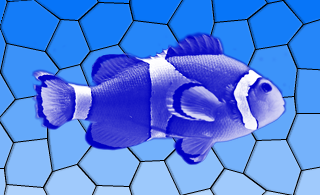
- class PySide2.QtWidgets.QGraphicsColorizeEffect([parent=None])露
- param parent:
Constructs a new
QGraphicsColorizeEffectinstance. Theparentparameter is passed toQGraphicsEffect鈥榮 constructor.
- PySide2.QtWidgets.QGraphicsColorizeEffect.color()露
- Return type:
This property holds the color of the effect..
By default, the color is light blue (
QColor(0, 0, 192)).
- PySide2.QtWidgets.QGraphicsColorizeEffect.colorChanged(color)露
- Parameters:
color 鈥�
PySide2.QtGui.QColor
- PySide2.QtWidgets.QGraphicsColorizeEffect.setColor(c)露
- Parameters:
c 鈥�
PySide2.QtGui.QColor
This property holds the color of the effect..
By default, the color is light blue (
QColor(0, 0, 192)).
- PySide2.QtWidgets.QGraphicsColorizeEffect.setStrength(strength)露
- Parameters:
strength 鈥� float
This property holds the strength of the effect..
By default, the strength is 1.0. A strength 0.0 equals to no effect, while 1.0 means full colorization.
- PySide2.QtWidgets.QGraphicsColorizeEffect.strength()露
- Return type:
float
This property holds the strength of the effect..
By default, the strength is 1.0. A strength 0.0 equals to no effect, while 1.0 means full colorization.
- PySide2.QtWidgets.QGraphicsColorizeEffect.strengthChanged(strength)露
- Parameters:
strength 鈥� float
漏 2022 The Qt Company Ltd. Documentation contributions included herein are the copyrights of their respective owners. The documentation provided herein is licensed under the terms of the GNU Free Documentation License version 1.3 as published by the Free Software Foundation. Qt and respective logos are trademarks of The Qt Company Ltd. in Finland and/or other countries worldwide. All other trademarks are property of their respective owners.